FlowGen — The Modern Mathcad Alternative That Keeps Everything Live
Engineers write reports in Word, but constantly screenshot results from Mathcad, Excel, Bluebeam, and WinBeam. Every change means updating screenshots. It's tedious and error-prone.
FlowGen is Word, but with live Mathcad, Excel, markups, and beam analysis built right in.No installation. No screenshots. Everything updates automatically.
Web-based & Cross-Platform — Works in your browser on Mac, Windows, Linux, and any device. Finally, a Mathcad alternative that works on Mac!
Change an input, and all calculations, sheets, and diagrams update instantly. Single source of truth. Fully auditable. Export-ready PDFs.
The Old Way vs The FlowGen Way
FlowGen looks and feels exactly like Microsoft Word. If you can use Word, you already know FlowGen. Plus, you can import and export DOCX files anytime — so you're not abandoning Word, you're upgrading it.
The Old Way (Painful)
1. Open Word
Start writing your calculation report
2. Open Mathcad
Do your calculations, take screenshots, paste into Word
3. Open Excel
Create spreadsheet, take screenshots, paste into Word
4. Open Bluebeam
Markup drawings, export images, paste into Word
5. Open WinBeam/Robot
Run beam analysis, screenshot results, paste into Word
6. Input Changes?
Go back to steps 2-5, retake all screenshots, re-paste everything. Pray you didn't miss any.
• 5+ apps open at once
• Dozens of screenshots to manage
• Manual copy-paste nightmare
• Outdated screenshots everywhere
• No version control
• Error-prone updates
The FlowGen Way (Simple)
1. Open FlowGen
Looks exactly like Word - no learning curve
2. Write + Calculate
Type text like Word, add live Mathcad-style calculations inline
3. Embed Spreadsheets
Add Excel workbooks directly in the document - they stay live
Change one input. Everything updates automatically. Done.
7. Need Word?
Export to DOCX anytime. Or import existing Word docs to FlowGen.
✓ Familiar Word interface
✓ Zero learning curve
✓ DOCX import/export built-in
✓ Everything updates automatically
✓ Always synchronized
✓ Full version history
Stop screenshotting. Start living in the future.
Ready to Get Started?
Try the demo — No account required, jump right in
Create calculations — Add MathCanvas for live math and derivations
Embed spreadsheets — Use FlowSheets for your calculation tables
Add markups — Annotate drawings with FlowMarkups
Export and share — Generate professional PDFs
Sign up free — Save your work and collaborate with your team
Core Components
MathCanvas — The Modern Mathcad Alternative
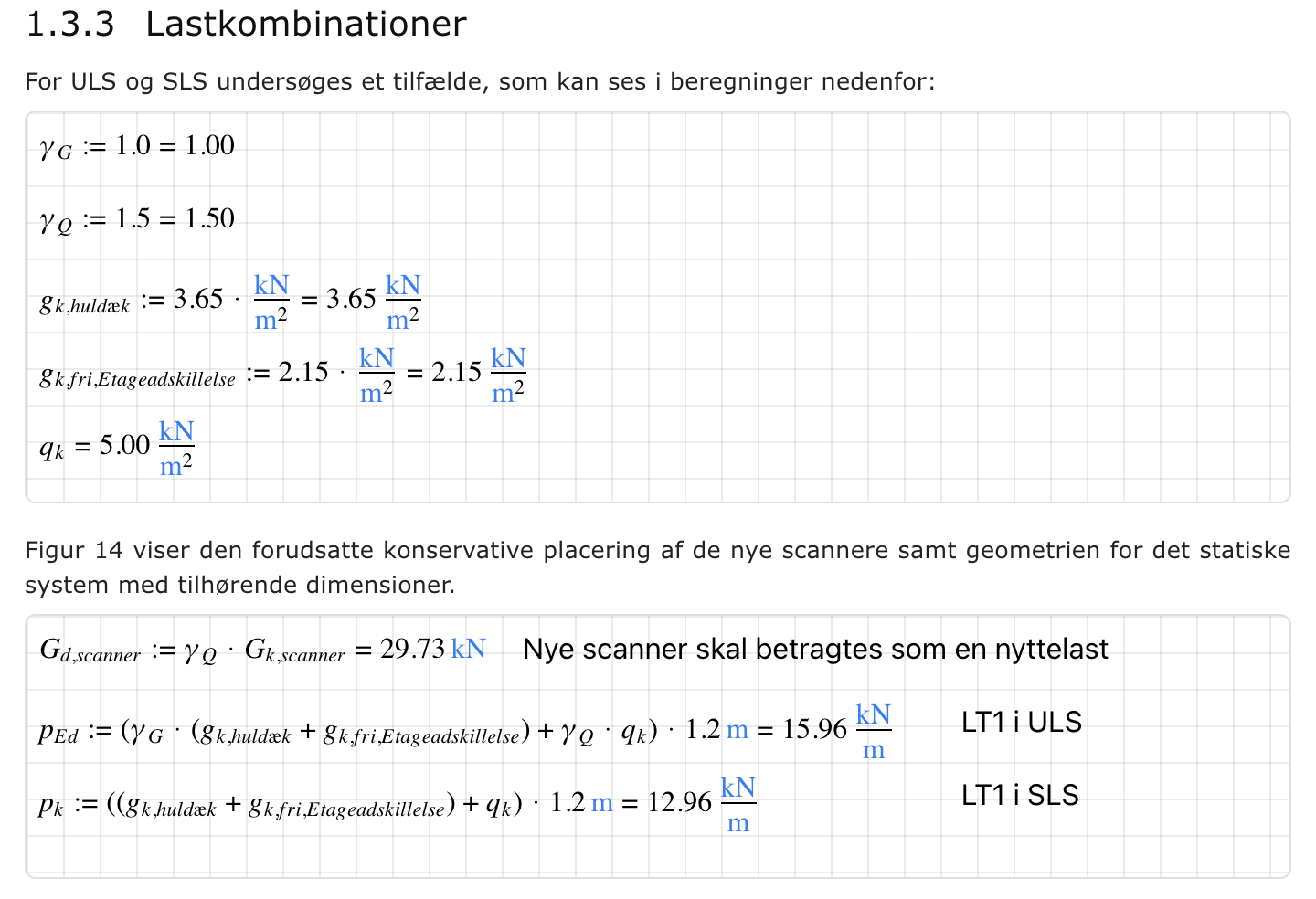
Create MathCanvas components and make engineering calculations directly in your document.MathCanvas lets you write formulas, define variables, and perform calculations just like Mathcad — but it's web-based and built right into FlowGen.
Top-to-bottom calculation flow: All canvas objects and variables calculate automatically from top to bottom, just like hand calculations
Live mathematics: Edit any variable and watch all dependent calculations update instantly
Unit-aware computing: Built-in units handling prevents calculation errors and unit mistakes
Copy and reuse: Duplicate calculations, drag variables around, and build modular calculation sheets
Perfect for engineering derivations, design checks, and hand-calculation style documentation. Write once, reuse everywhere — no more screenshot hell.
FlowSheets — Excel Inside Your Document
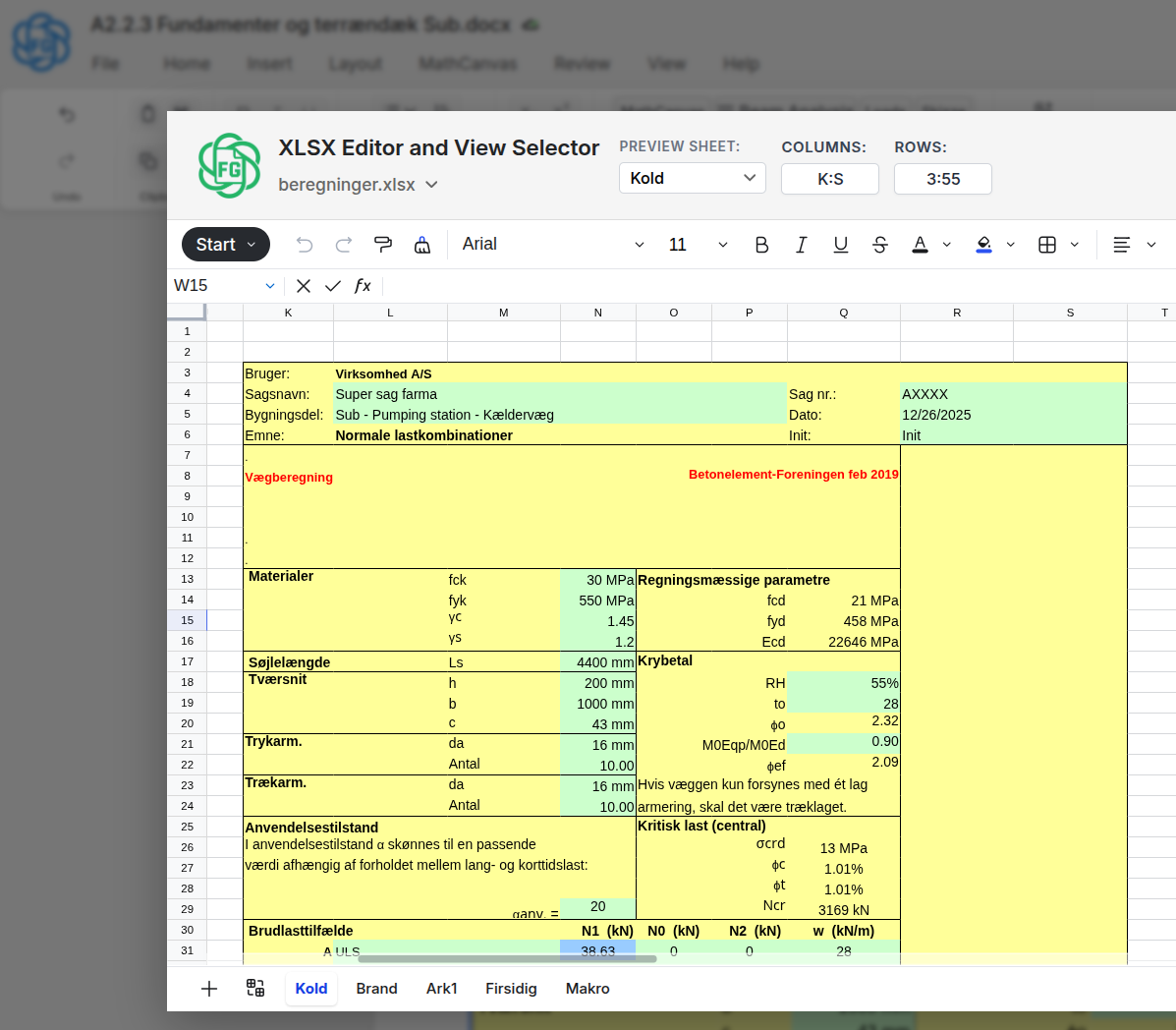
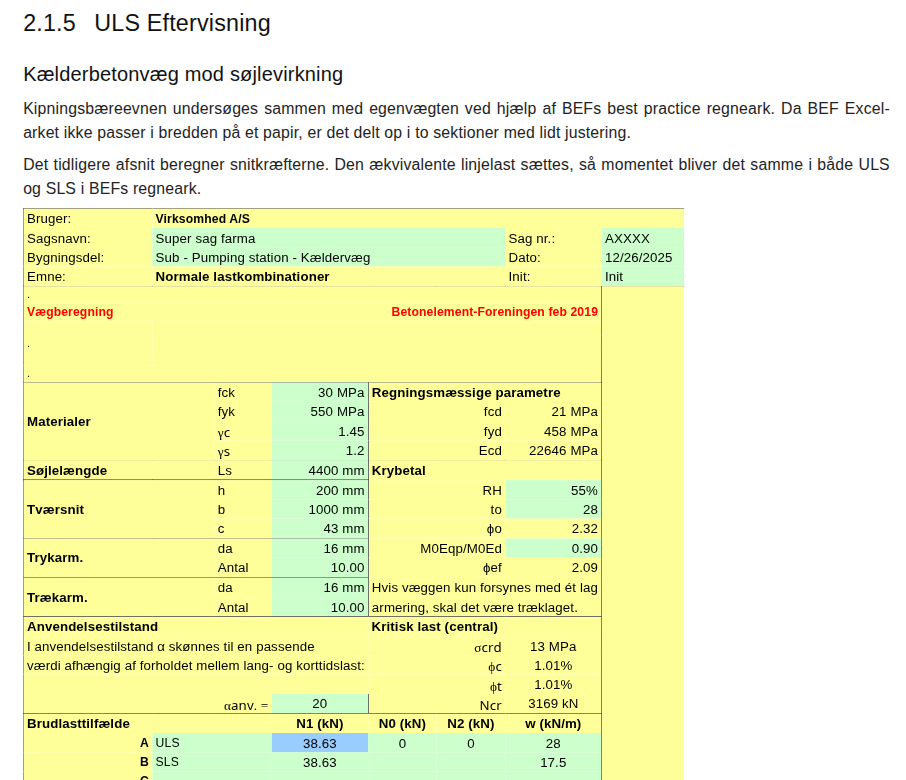
Embed Excel workbooks directly in your document — think "Excel inside Word" with live viewports.Add specific table views from your FlowSheets into your document text. Edit the sheet once, and all viewports update automatically everywhere.
Edit once, update everywhere: No more copy-paste from Excel
Live synchronized data: All viewports refresh automatically when you edit the source
Full traceability: Click any viewport to see the complete calculation
Perfect for parameter tables, load combinations, and material properties.
Edit your calculations in the FlowSheets Excel editor
Viewports automatically update in your document — no copy-paste needed
FlowMarkups — Annotate Everything
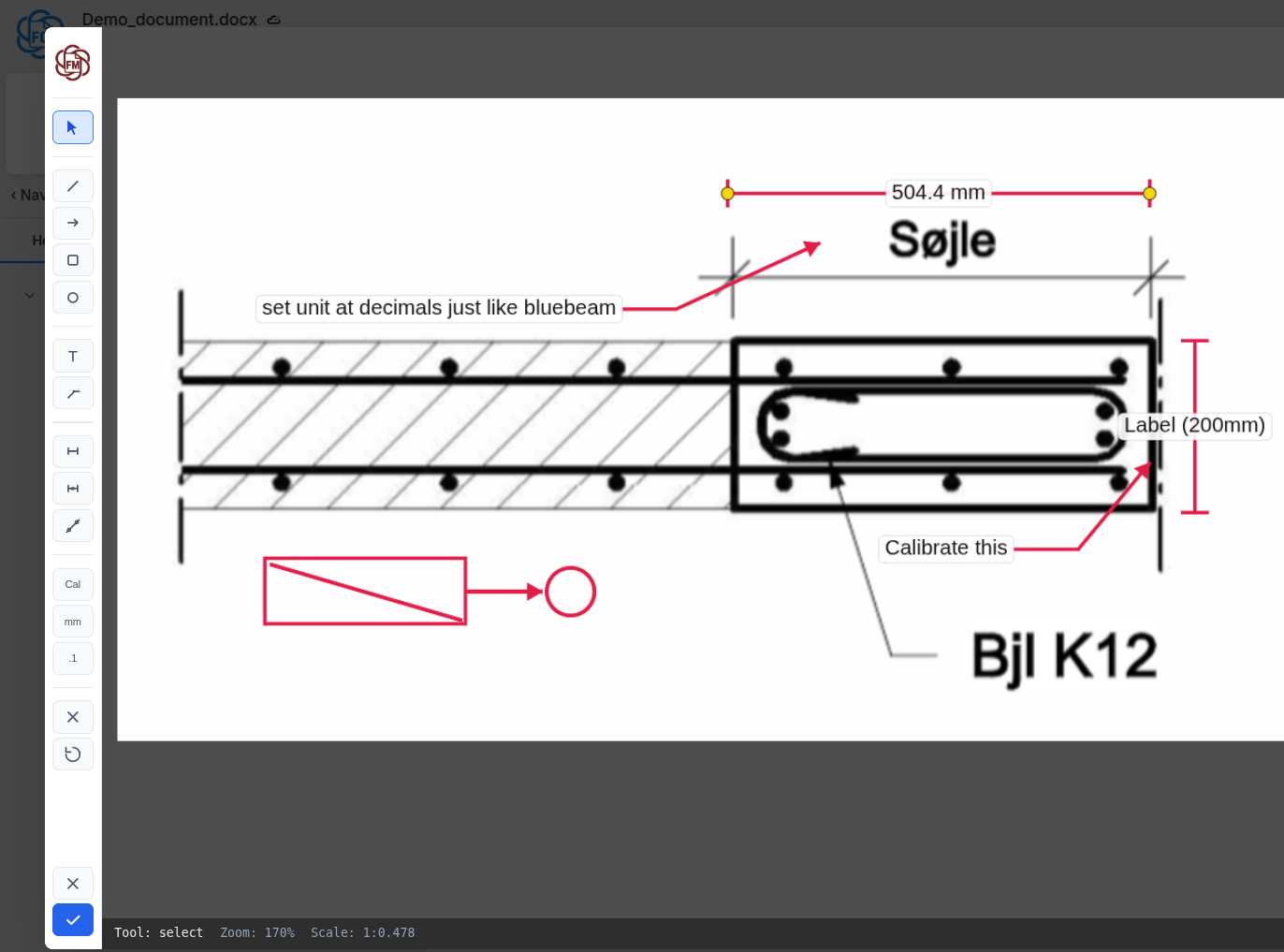
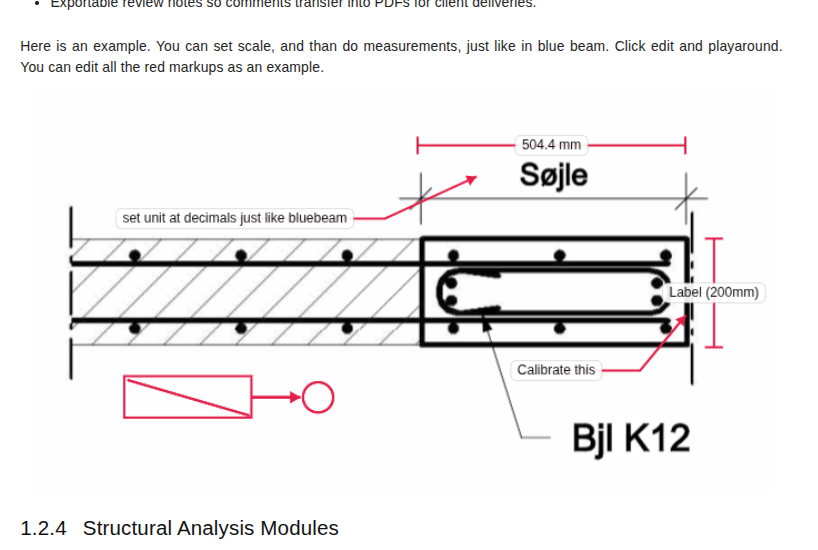
Annotate drawings directly in your document — think "Bluebeam inside Word" with live viewports.Add dimensions, measurements, callouts, and markups to your images. Set the scale and measure accurately.
Full annotation toolkit: Dimensions, arrows, shapes, text labels, and measurements
Scale and measure: Set drawing scale for accurate distance measurements
Edit once, update everywhere: All viewports refresh automatically
Perfect for structural drawings, sketches, and detail callouts.
Annotate and measure in the FlowMarkups editor
Viewports automatically update in your document — no re-exporting needed
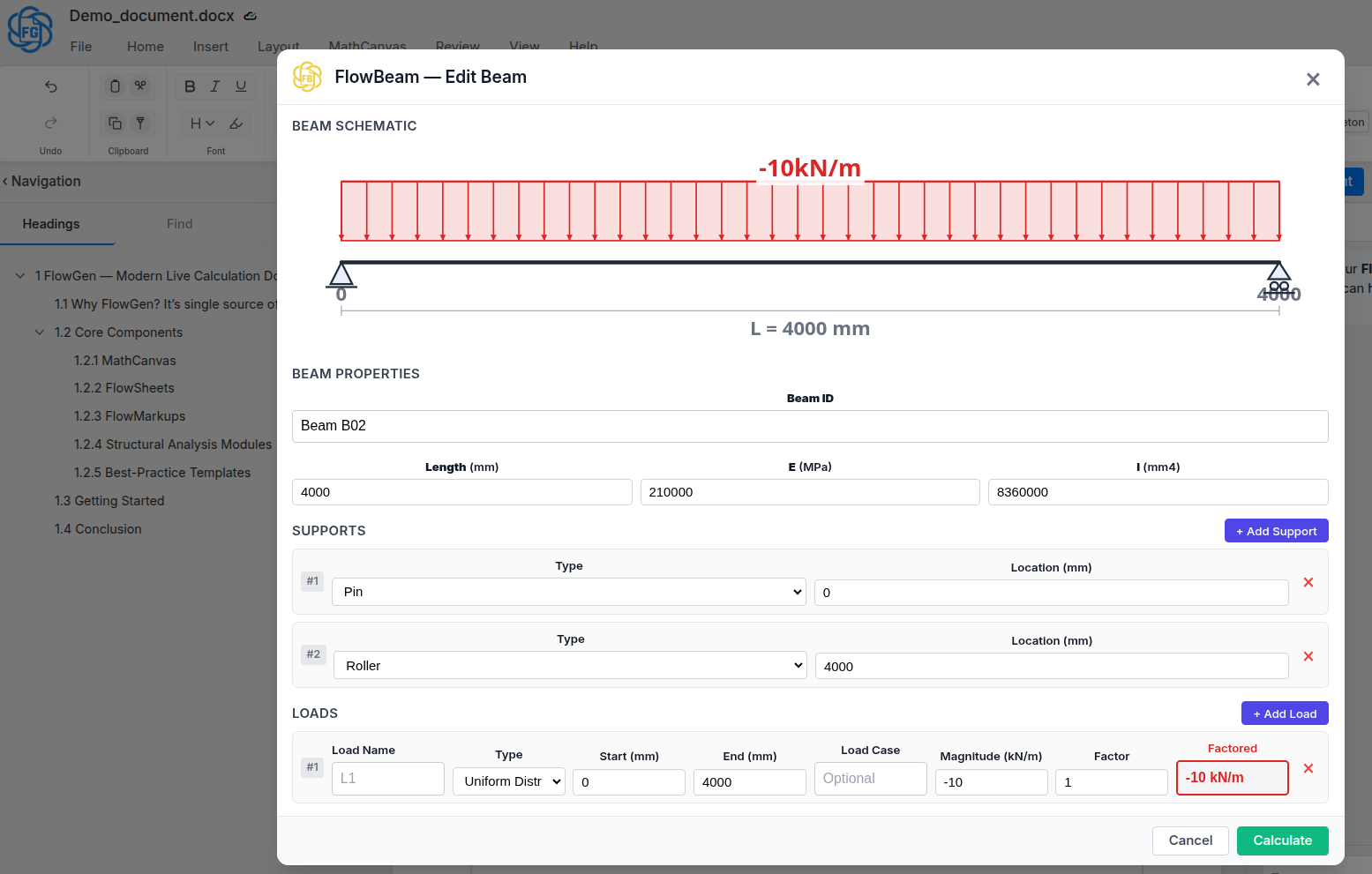
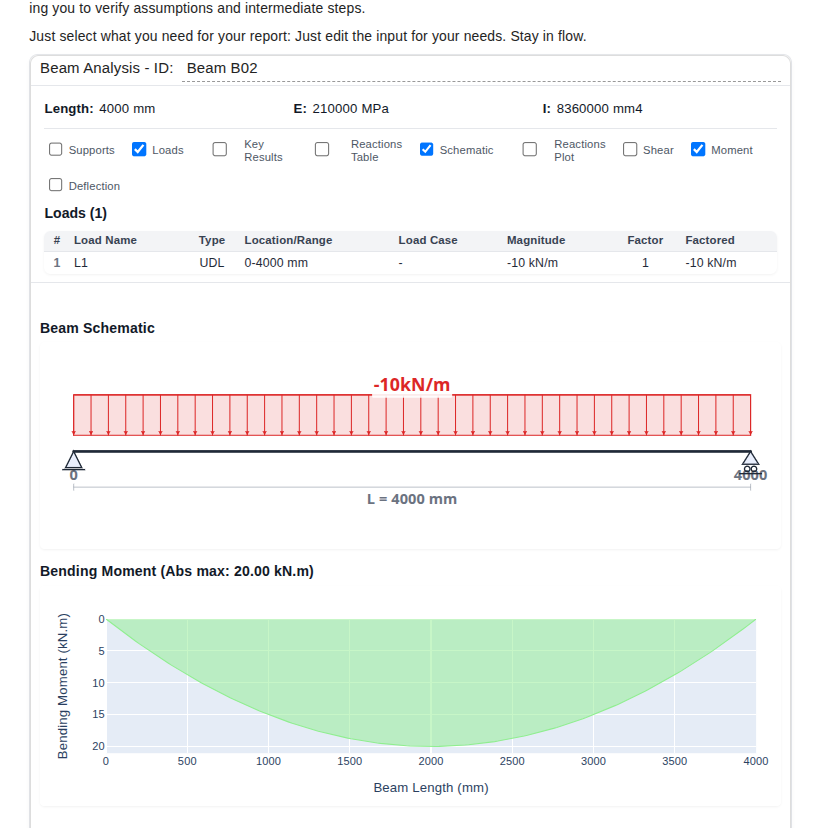
Built-in structural analysis — no external software needed.FlowBeam handles beam analysis, FlowFrame solves 2D frames. Change loads or geometry and watch all diagrams update instantly.
FlowBeam: Beam analysis with shear, moment, and deflection diagrams
FlowFrame: 2D frame analysis with multiple load cases
Live results: All diagrams update automatically when you edit inputs
Linked to FlowSheets: Connect results to your spreadsheets
Configure your beam, supports, and loads in the FlowBeam editor
View live analysis results with shear, moment, and deflection diagrams in your document
Template Library
Pre-built templates for Eurocode calculations, load combinations, and standard design checks. Copy, customize, and adapt them to your office standards.
Multiplayer Collaboration — Like Google Docs for Engineers
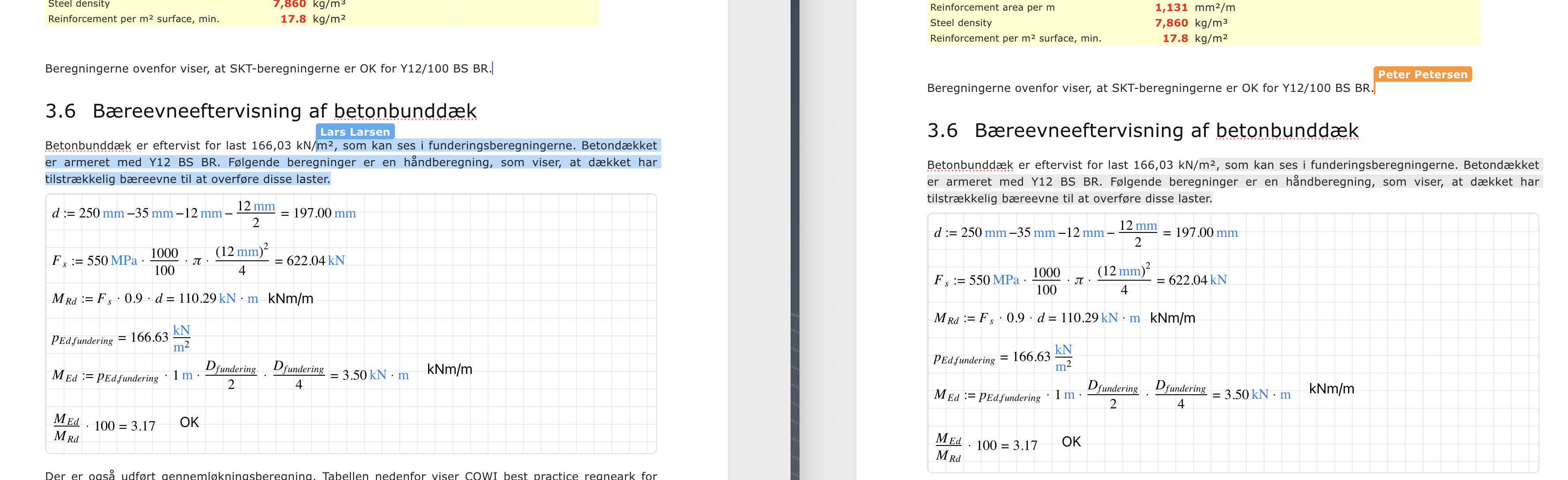
Live. Snappy. Multiplayer. FlowGen brings the same real-time collaboration experience you love from Google Docs to engineering calculations. Multiple engineers can edit the same document simultaneously, see each other's live cursors, and watch changes appear instantly as they're made. It's fast, smooth, and feels like magic.
No more emailing versions back and forth. No more "John's version final_v3_FINAL_USE_THIS.docx". No more merging conflicting edits or losing work. Just pure, seamless real-time collaboration.
Live cursors & selections: See exactly where your teammates are working in real-time, just like Google Docs
Instant synchronization: Changes appear on everyone's screen the moment they're made — no lag, no refresh needed
Zero conflicts: Everyone works on the same live document, automatic conflict resolution built-in
Snappy performance: Optimized for speed — edits feel instantaneous even with multiple users
Full history & versioning: Track who changed what and when, restore any previous version instantly
No setup required: Just share a link — your team is instantly collaborating
Perfect for design reviews, peer checks, and team calculations. Your senior engineer can watch your work live, make suggestions in real-time, and see your updates instantly. It's like pair programming, but for engineering calculations.
Multiple engineers working together in real-time — see live cursors, instant updates, zero conflicts
Why Engineers Choose FlowGen as Their Mathcad Alternative
Web-based, cross-platform, and completely free. No installation required — FlowGen runs in any browser on Mac, Windows, Linux, and any device. Finally, a Mathcad alternative that works perfectly on Mac!
Web-Based
Access from anywhere, no software to install
✓ Works on Mac
No Windows required, no virtual machines
✓ Live Math
Equations update automatically
✓ Unit-Aware
Built-in units prevent errors
✓ Collaboration
Real-time editing and version history
✓ 100% Free
No credit card, no limits, no restrictions
Get in Touch
Have questions, feedback, or want to learn more about FlowGen? We'd love to hear from you.
Join the Community
Connect with other structural engineers using FlowGen. Share templates, ask questions, and suggest features.